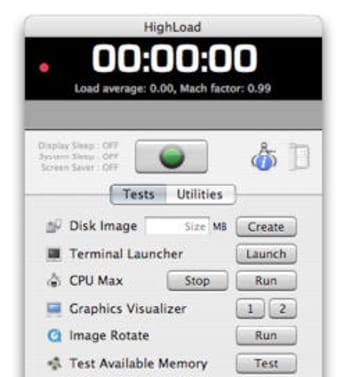
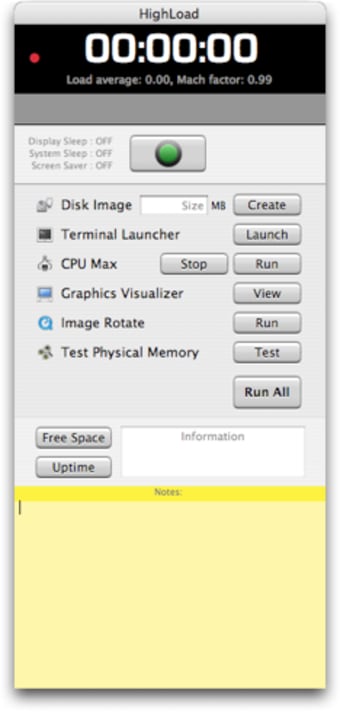
You control all the tests from one simple, two tabbed interface divided in tests and utilities. Your Mac's performances are shown as load average and Mach factor at the top of the interface. What I liked about this application is that you can perform all the major troubleshooting tasks quickly: set to CPU maximum, launch the graphics visualizer, image rotate and test available memory. HighLoad can also allow you to quickly disable specific features like sleep and screen saver, to get a better testing environment. The time spent testing will be indicated at the top of the interface.
Apart from these operations you can launch the Terminal and create a disk image and even perform more common tasks like purging cache, verifying preference files and rebuilding the index in Spotlight and Mail.
In all, HighLoad is very handy to test the general and specific performances of your Mac and see if something is going wrong. The simple interface makes it accessible to anyone. Recommended.
Pros
Great for testing purposes
Easy to configure
Select areas to test
Cons
None
HighLoad is comprised of a set of helpful processes designed to assist in troubleshooting your Mac.
In addition to the functions described below, HighLoad will also place the machine in an environment better suited for testing. It will temporarily disable the System Preferences Energy Saving features such as display sleep, system sleep, as well as the screen saver.
HighLoad will display the current system load average and Mach factor in its main display, in addition, a blinking red status light will let you know if the machine is still functional if no other visual cue is available.
Let the timer keep track of how long the machine has been in testing. No more estimations means a more efficient work-flow when testing multiple machines.
HighLoad will test available physical memory using memtest to make sure it is faulty free. No parameters to set or complex commands to issue, just one click. The test progress and results will appear in a window adjacent to HighLoad.
Update Prebinding, Repair Disk Permissions, Clear Cache Files, Run Periodic Tasks and more when issues are found or just as routine maintenance. Highload incorporates these tasks into one convenient location for easy testing.
Laws concerning the use of this software vary from country to country. We do not encourage or condone the use of this program if it is in violation of these laws. Softonic may receive a referral fee if you click or buy any of the products featured here.